Hi! I’m experiencing something of a conundrum. I am running MIAB on a Linode VPS, an was notified that my IPv6 /64 range is listed on Spamhaus XBL and CSS. This is a dedicated IPv6 /64 range I got from Linode that should only be used by this machine. To get around this issue, I’ve disabled IPv6 everywhere I could (removed the address from MIAB’s configuration, set Postfix, Dovecot and SSH to all only use IPv4), and I’ve removed the AAAA records for my domain. I’ve also checked auth.log and mail.log and didn’t find anything suspicious looking there. Despite all of this, Spamhaus is seeing SMTP connections on port 25 from my IPv6 /64 range even after I made these changes.
"A device (computer, server, mobile phone, etc), or an app on a device that is using (my ipv6)::/64 is infected, badly misconfigured, or compromised. It is making SMTP connections with multiple unrelated HELO values on port 25.
The most recent detection was on: January 15 2026, 12:25:00 UTC (+/- 5 minutes). The observed HELO values were fdtincycdi.optinunder.uk.com, kchlcsuyiz.layercoch.uk.net, hjxrmaxaht.resprsteep.us.com, rtuuyajmlx.systctlpro.uk.com, kpbuunnrzb.norichansritt.uk.net."
Linode doesn’t allow for disabling IPv6 in their Network Helper (though it is possible to disable that and make changes via Netplan but that’s a hassle), I did try disabling IPv6 via GRUB but that seemingly completely broke MIAB which is… suboptimal. I changed the root password just in case today, but does anyone have an idea what might be going on? Thanks in advance for any help!
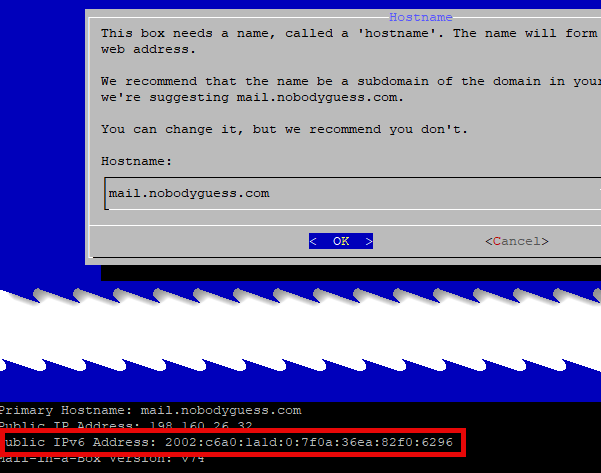
I cannot confirm this is intended behavior, but it has worked for me consistently, and it may work for you. Run the mailinabox installer as you normally would. You will note it detects and uses the IPv6 on the box, as shown:
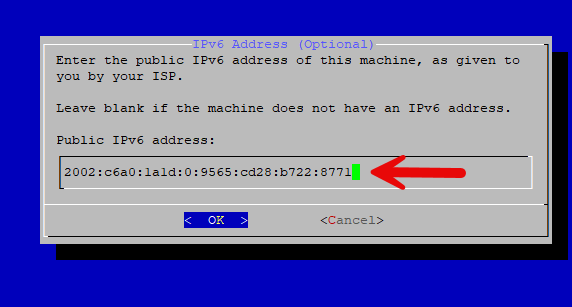
Reboot immediately and run mailinabox again. You will now see a second prompt with your IPv6 address, where you can backspace to remove the address and continue:
something on your computer connects to port 25, and it’s not postfix, because that uses a different helo
To disable ipv6 on your computer, see How to Disable IPv6 on Ubuntu Linux to uses sysctl to disable ipv6. The way you have used now only disables ipv6 usage by mailinabox, not on the complete server.
Note, I recently saw another report on ipv6 and spamhaus from Linode from another Mailinabox user. Not sure the cases are correlated, but I wonder if Linode really ensures your box is the only one that can make use of the assigned /64
Yeah, I tried doing that before but Linode machines don’t allow it while I’m using their Network Helper, so I’d have to switch to manual network configuration with Netplan instead to fully disable it. I did try disabling via GRUB but that broke MIAB completely. I’m gonna see if I can find what’s connecting on port 25 despite it not showing up in logs that I’ve been able to find.
I’ve now set up logging with auditd to catch any attempts at making outbound connections on port 25, as well as blocked all outgoing IPv6 traffic on port 25 since I’ve already disabled IPv6 in Dovecot and Postfix. Gonna wait and see what shows up in the logs so I can hopefully figure out what’s going on next time.
If the spammer is someone else who’s using an address in the same /64 subnet, you won’t see anything in your logs, nor any activity on your ports. The spammer is on a different machine. It just happens that your’s and their machines are within the same /64.
I think the only way to resolve this is to get your own /64, one that is completely yours and not available to anyone else. Which is what linode should have given you anyway
Yeah, see, this is what I already have. I had this issue in the past and they gave me my own range. It’s very frustrating. That’s why I’m thinking it should be something on my machine.
Hmmm. If it is coming from your machine, you will only see the mail in the logs if the mail is going through the normal process.
If it is coming from some spambot that is on your machine, the spambot will be sending directly (bypassing the normal email process) and won’t be logging anything!
You might see port activity using something like ss -t6p '( dport = 25 )' The ss program shows current port activity. But note that it takes very little time to send an email, so you can easily miss stuff - keep watching.
If it is something on your server, you have to ask “how did it get there?” (said in a David Byrne voice), “who has access to the machine?”, “what (else) has been installed?”.
Removing unwanted software is not always easy. If it really is from your machine, then I would backup the email (in /home/user-data/backup/encrypted/ and the secret key), blow the machine away, start with a known clean Ubuntu image, rebuild your server, and make sure nothing else is installed on it.
(I still think it likely that someone else is sharing your /64, but that might be difficult to confirm.)
I did try to set up auditd to record outgoing ipv6 connections, and nothing’s showed up there. I also turned off all IPv6 capabilities with sysctl at runtime (Linode’s network helper turns it on again at reboot but until then it’s all turned off), and Spamhaus has continued to record outgoing TCP/25 on the IPv6 /64 with multiple unrelated HELOs after that. To me it does look like something is on my /64 that should not be. I think, at least.
Honestly I’ve been meaning to switch to a non-US based VPS provider and this is kind of pushing me towards making the switch sooner rather than later… especially since I contacted a Swedish provider’s support to ask if they allow email server hosting and they got back to me within minutes, haha.
Did you try to force ipv4 use ? if not give a try.
To force your Ubuntu 22.04 system to prefer IPv4 without completely disabling IPv6,
you need to modify the /etc/gai.conf file to change the address selection precedence.
1.Open the configuration file in a text editor with administrative privileges.
sudo nano /etc/gai.conf
Locate the lines related to IPv4 preference. The file contains commented-out examples of how to prioritize IPv4 over IPv6.
Look for a section that mentions “prefer IPv4” or “precedence ::ffff:0:0/96 100”.

Uncomment the relevant line(s). You need to uncomment the line that sets a high precedence for IPv4-mapped addresses.
Specifically, uncomment the following line by removing the # character from the beginning:
#precedence ::ffff:0:0/96 100
It should look like this after editing:
precedence ::ffff:0:0/96 100
You can also add a general precedence rule if it is not already present to ensure IPv6 has a lower default priority than the newly added IPv4 rule:
Precedence for IPv4-mapped addresses
precedence ::ffff:0:0/96 100
Default IPv6 precedence (optional, usually default)
precedence ::/0 40
The higher number (100) gives IPv4 addresses higher priority during the address sorting process specified by RFC 3484.
It is already configured to only use IPv4, but something on my /64 range still is getting caught by Spamhaus. At this point there are no practical issues for me, since the IPv6 doesn’t cause any issues for my email, but I also want to make sure there’s nothing on my server that shouldn’t be, and if the issue is with Linode, that they fix the issue on their end.
 I changed the root password just in case today, but does anyone have an idea what might be going on? Thanks in advance for any help!