Is it possible to set up multiple domains on a single Mail-in-a-Box instance using one public IPv4 address? (I use an external DNS provider.)
Is there a more detailed guide available?
If I understand correctly, do I simply run the installation script again and enter the new domain?
Do I configure the DNS settings using the same parameters, just with the new domain name?
Are there any examples?
Thanks in advance for the clarification!
I managed to add the domain, and email is working partially—but it’s not reaching Gmail; there’s an issue with DMARC and DKIM.
Should I apply the settings to the newly added domain (which isn’t working), or to the box.first-domain domain?
Thanks for the help!
I am using external DNS.
My primary (main) domain is with web4u.cz; I managed to get that configured correctly, and emails to Gmail and other services are working fine (I had to troubleshoot that, but it was successful).
Now, for other domains that I want to route to the mailbox—which are currently registered with webkitty.eu (I kept them parked there cheaply, so I don’t want to transfer them just yet for this experiment)—I have pointed them to the mailbox. I also generated DKIM and DMARC records. I am able to send emails to some destinations, but so far, I haven’t been able to send anything to Gmail.
I am using a translator tool (I only speak Czech
I’m still trying, but it’s not working. I created a new directory for an additional website linked to a domain and redirected the chosen domain to it, but the default webpage still appears instead of the new one. Where could I be going wrong?
(The file and directory permissions are the same as the default ones.)
To elaborate further on my issue: I have a functional MiB setup with mail on a standalone computer (IP:1) and a web server on a separate, standalone computer (IP:2).
Specifically, “domain.1” is hosted entirely on MiB, “domain.2” is also hosted entirely on MiB, and for “domain.3,” the mail (MX) is on MiB (IP:1) while the web server is on IP:2.
In short, for one of the domains, I have configured the external DNS to point to two different IP addresses: IP:1 (for MX/mail) and IP:2 (for the web server).
Mail for this domain is working correctly—messages are being delivered and sent without any issues (even Gmail accepts them).
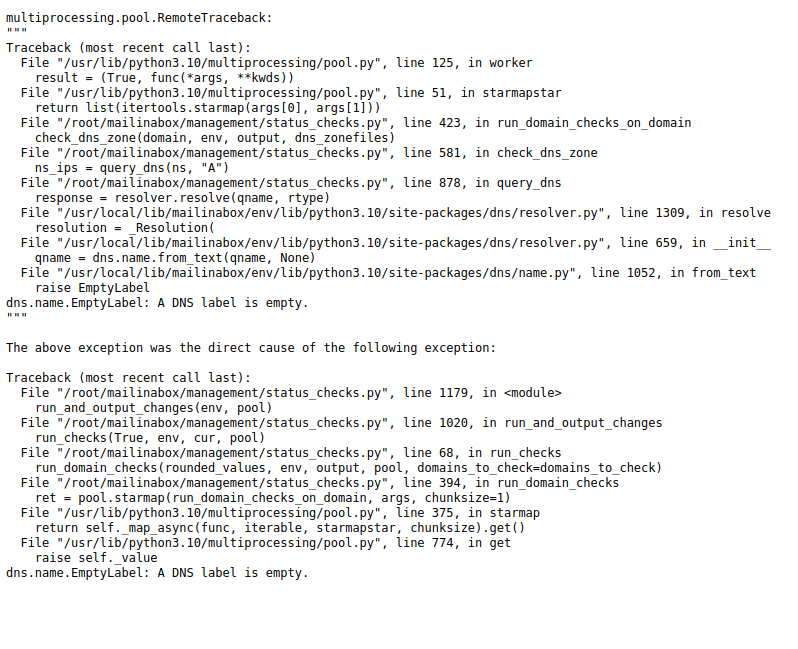
However, the log shows the following (see attachment):
Can you provide what you filled in the Using a Secondary nameserver section of the Custom DNS page on your admin panel? Take care to include all spaces
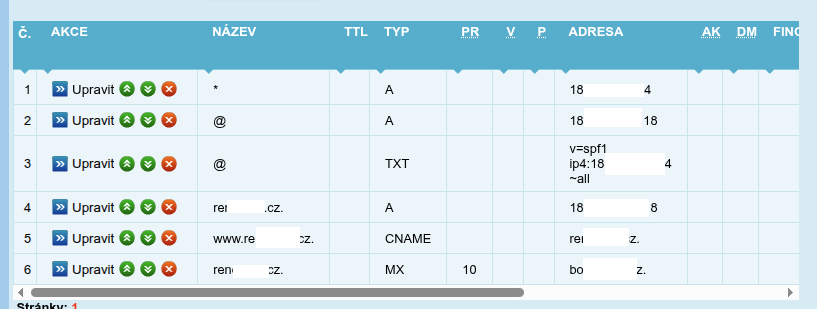
My custom DNS settings are empty,
and the secondary DNS is listed only as: ns.web4u.cz.
(See the screenshot for details.)
The error in the log did not occur with the first (main) domain; it only appeared after I added the domain that has its email and web services split.
Yes, there is a dot. We took the configuration from another domain that was set up with the support of Web4U.cz, they explicitly require the dot there. (in their interface) it works for me on another domain without errors
It seems to me that the problem is that MiB is doing a check and it is getting a different IP address which was probably not calculated, otherwise the website and email work.
From this I conclude that it is more of a control mechanism.
(or even a wrong entry would be reported to web4u)
if I delete it I get a warning about invalid configuration
yeah now I understand… in MiB, it was there before adding and this message wasn’t displayed, I’ll try there
So there is no dot on the line in MiB, it was created while writing, probably here
Not sure I’m following you entirely. There is indeed a checking mechanism, which feeds the Status Checks page and also a nightly check to inform you of changes within this status.
Now, is the Status Checks window working?
What I see in the code is that there is a dns lookup done for the ns server you filled in the Secondary Nameserver window, which somehow fails. This is why I’m focusing on the Secondary Nameserver configuration.
If the secondary nameserver field only contains nameserver (without dot at the end) we can check the following. It’s a bit farfetched but can you do cat /home/user-data/dns/custom.yaml?