I have been running MIAB with IPv6 disabled. I am now getting these errors. should I enable IPv6?
host gmail-smtp-in.l.google.com[2607:f8b0:4023:1002::1b] said: 550-5.7.1
[2600:3c00::2000:98ff:fefa:77c] Gmail has detected that this message
550-5.7.1 does not meet IPv6 sending guidelines regarding PTR records and
550-5.7.1 authentication. For more information, go to 550 5.7.1 Email sender guidelines - Google Workspace Admin Help
46e09a7af769-7c6e31d1c93si851956a34.85 - gsmtp (in reply to end of DATA
command)
MIAB should handle IPv6 and all the various bits and pieces out of the box. The only thing I’ve had to do was add a glue record, create a zone file for IPv6 reverse DNS delegation, tell my ISP to delegate to my name box
When I run System Status Checks, I get these messages about IPv6:
Incoming Mail (SMTP/postfix) is running and available over IPv4 but is not accessible over IPv6 at 2600:3c00::f03c:91ff:fe2e:1811 port 25. Outgoing Mail (SMTP 465/postfix) is running and available over IPv4 but is not accessible over IPv6 at 2600:3c00::f03c:91ff:fe2e:1811 port 465. Outgoing Mail (SMTP 587/postfix) is running and available over IPv4 but is not accessible over IPv6 at 2600:3c00::f03c:91ff:fe2e:1811 port 587.
Test results say that PTR is set correctly for both ipv4 & ipv6. mail to gmail is still being flagged as spam. I have put a google-site-verification TXT record in my DNS but google cannot find it even after 1-2 hours time.
I see 2600:3c00::f03c:91ff:fe2e:1811 indeed has PTR set, so that is good. But in the reject mail from google it says 2600:3c00::2000:98ff:fefa:77c which is different. And that last one does not have PTR set. Can you check you don´t have multiple IPv6 addresses bound to your box? Also check the content of /etc/mailinabox.conf
I see three TXT records containing google-site-verification on your domain. Maybe remove them all and only add one?
Final question: I see you modified the SPF record to include the IPv4 address of the box. Any reason for that? You are not trying to relay mail to another server correct? At any rate, there is a syntax error in there. The = in there should be a :
Even if this is all fixed, it might take google a while to allow your mails once more.
I have been running the same IP addressed mail server for several years now. my mail to gmail users almost always is routed to spam. I have checked DKIM, DMARC, SPF, PTR and they all appear to be set up correctly. What else can I do?
I used dig. I went to google postmaster tools. I did not have verification for each domain name I use to send mail from. I only had my mail server listed. I am hoping this solves the problem.
Did you confirm there is only one ipv6 address assigned to the box?
I see the TXT record for google-site-verification under your box.domain, it should be under domain (without the box.) You verify ownerships of the domain with google, not the sending box.
Did google postmaster tools accept this as verification for your domain?
There is still a modified SPF record. Do you have a reason for that?
I ran the test you suggested at https://www.email-security-scans.org/ and received a very low score of 4/10. Under Transport they said neither IPV4 not IPV6 email delivery are provided. Under TLS/Encryption it says “Your email provider/server does not support transport encryption.” Under DNS Resolution it says " The DNS resolver, your email provider/server relies on, does not support DNS resolution over IPv6." Under DNS Configuration of Your Zones/Mailservers it says “Some names needed for email delivery are not IPv6 resolvable.” and “Some names needed for email delivery are not DNSSEC signed.” Under Sending Host Configuration & Authenticated Sender it says " Your Mail-Setup is NOT IPv6 ready!"
Ugh. Where do I begin to solve these errors? Thank you again for your guidance.
I wouldn’t bother with that test result. There seems to be something wrong there. Not sure why, but with those test results you wouldn’t be able to receive any mail. The topic concerns with sending mail to gmail, so other stuff is working, right?
Hey everyone! New here and grateful for this amazing product and that there is a Discourse support community to boot!
I just installed a new box with a new domain for the first time, about 9 days ago. I am able to receive email but not send it to Google (or microsoft). I initially set up the server with ipv6 but saw the setup instructions say to skip it. So removed ipv6 later. Did that mess up my install so I should start over on a new box, and leave ipv6 in place?
I also ran the test you mentioned above and see some errors including some about ipv6.
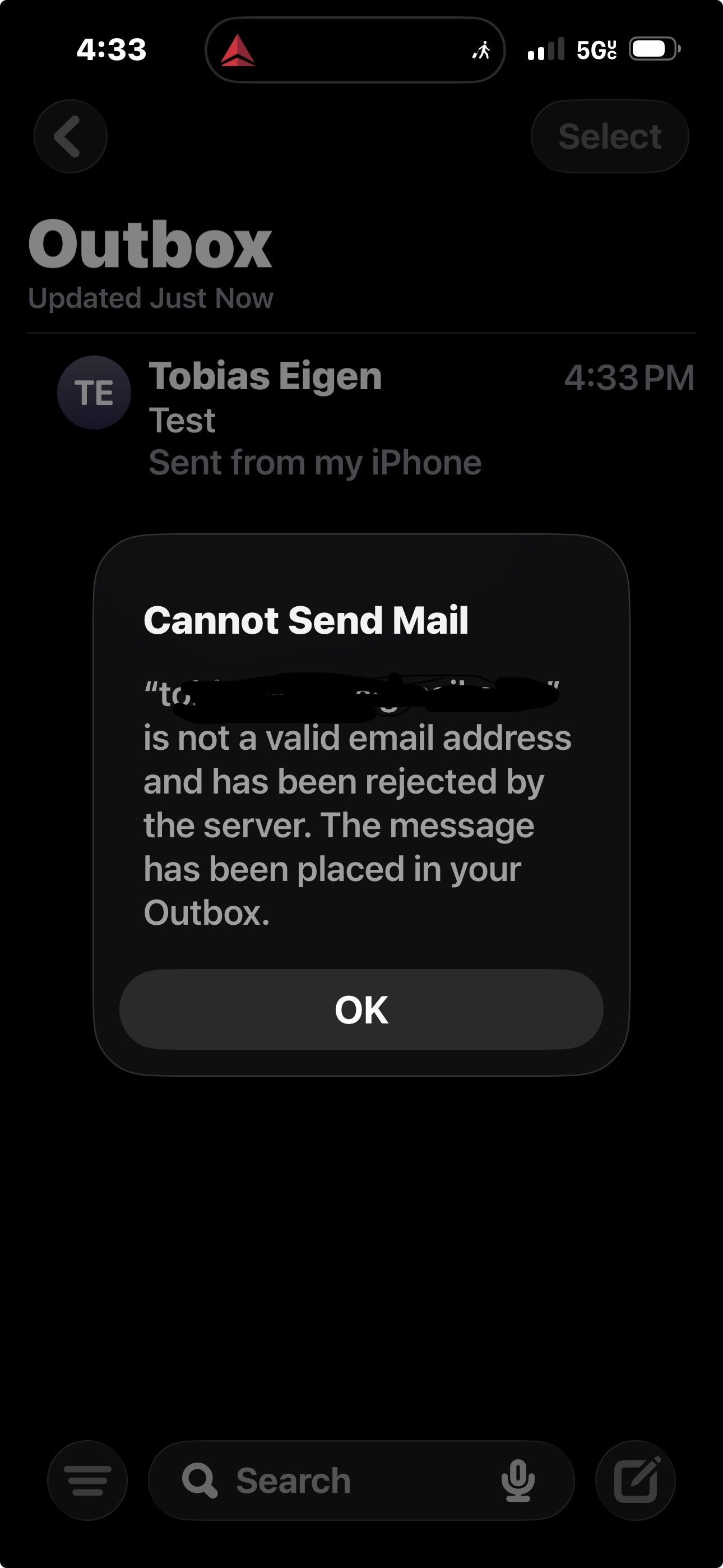
Here is the error I see on my iPhone mail app when I try to send my google account an email from the box.
Might be better to create your own topic and not high jack this one.
In the meantime:
How did you remove the ipv6? Your box is now probably configured to use it, so it’s probably best to start new. That way you’re sure you have a fresh start.
Once that is done, check the System status view in the admin panel. Does it show all green?
Thanks for the response! It can sometimes be hard to know where to put a question on a forum like this and I am new here, so many apologies. (I do know this because I worked until recently at discourse.org myself and was community manager there!) Happy to have a moderator move this to a new topic if it’s not too much trouble.
I’ll spin up a new box and let you know how it works out and what I learn. I guess the tl;dr is that you have to be pretty careful following the directions from the start and not make changes outside the box admin when you are done that will then confuse the box!
One clarifying question before I start… the setup guide includes this line:
If you have a choice, choose a location for your machine that is near you — it’ll be faster! And if disabling IPv6 is an option, disable it.
I’m not sure what to make of that. I use hetzner and by default it includes both ipv4 and ipv6 when you spin up a new server, at no extra cost. But I can disable ipv6 at the point of spinning it up. Should I do that? Or should I keep it and use it?
My choice would be to leave IPv6 in place everywhere. I haven’t found it to be a problem. If you do want to use it, you will need to manage IPv6 reverse DNS delegation. (It’s not difficult, I think there’s a old forum post from me on how to do that.)
If you want to avoid IPv6, you could remove the external IPv6 addresses from your instance. But I think, but can’t confirm right now, that you can install MIAB and during setup, you just remove the IPv6 address which it finds, then you’ll have a box which works but doesn’t send or listen on IPv6.
Certainly do not disable IPv6 at the Linux networking level because some systems installed and used by MIAB use IPv6 internally and no IPv6 will cause confusion
Thanks, Andrew! I went ahead and left ipv6 in place when I installed mailinabox the second time. So far it seems to be working pretty well! Everything green, and email sending and receiving works from a bunch of different providers including google.
Right now I am in the process of using imapsync to move a bunch of accounts over to the box. That seems to be working too!
One thing I am learning is that mailinabox is robust and solid, but does require some advanced planning because there are some things that are hard to change later once you get going.
Really appreciating this product and being a part of this community.

 Incoming Mail (SMTP/postfix) is running and available over IPv4 but is not accessible over IPv6 at 2600:3c00::f03c:91ff:fe2e:1811 port 25.
 I went ahead and left ipv6 in place when I installed mailinabox the second time. So far it seems to be working pretty well! Everything green, and email sending and receiving works from a bunch of different providers including google.
